A remote for the Beyond Power Voltra
A dial for your Voltra.
Turn the dial, the weight changes. Tap, it loads. Tap again, it releases. It talks to the machine directly over Bluetooth.
Unofficial. Not affiliated with, endorsed by, or supported by Beyond Power. It controls a machine that pulls on a cable you are attached to. Read the safety page before you use it.
Install
Plug the device into a computer, open this site in Chrome, press Install.
Guide
How to use it, screen by screen: loading, auto load, chains and eccentric, drop sets, settings.
What it does
One dial and one round screen, and weight training is the only thing it knows how to do.
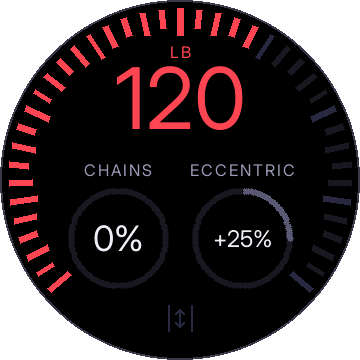
- Turn the dial to set the weight. Spin fast and it snaps to the 5 lb grid; click slowly for exact pounds.
- Tap to load from the cable's retracted position. Tap again to release. While loaded, a press anywhere that is not a gauge releases on contact.
- Hold to auto load: the machine engages at the cable's current position once you pull, so you can walk to a leg press with the handle already in your hands.
- Hold a gauge and turn to set chains and eccentric overload.
- Drop sets that run themselves: after a rep count, when you set the cable down, or when you say "drop".
- Swipe down for settings. Swipe up to come back.
What you need
- A Beyond Power Voltra I. This is the only machine it has been tested on.
- A Waveshare ESP32-S3-Knob-Touch-LCD-1.8. The round-screen device with a rotary dial, touch and a haptic motor.
- A USB-C cable and a computer running Chrome or Edge, for the one-time install. After that the remote runs on its own battery.